Academy
Cross Stitch Pattern From Photo: 6 Photos, 1 Setting
By Threadhood Content Team · · 6 min read
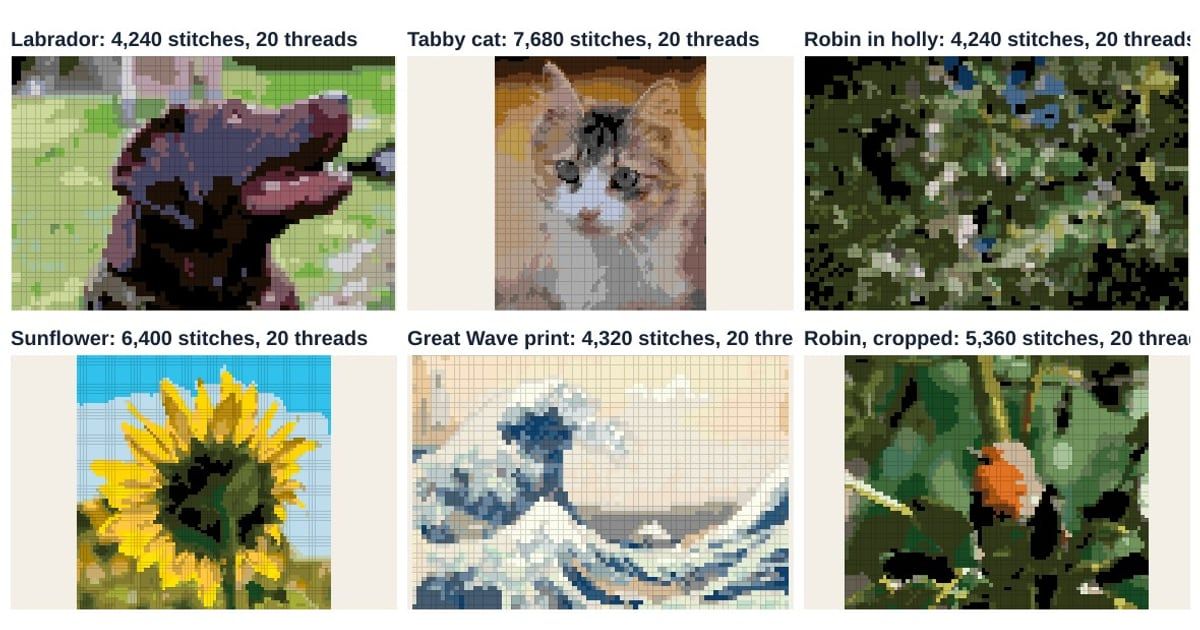
You pick a favorite photo, run it through a converter, and get back a muddle of greens and grays. The next photo looks great. Why?
The photo decides it, more than any slider. To show how, we made a cross stitch pattern from photo six times at identical settings, then compared the numbers. The pattern is in the numbers, and it tells you what to look for before you press the button.
How we ran the six photos
Every photo went through the Threadhood converter at the same settings: 80 stitches wide, up to 20 colors, DMC thread, Tidy lone stitches on, Blend colors off. Only the picture changed. The photos are CC0 from Wikimedia Commons (here is the Labrador), apart from the Great Wave, a public domain print by Hokusai.

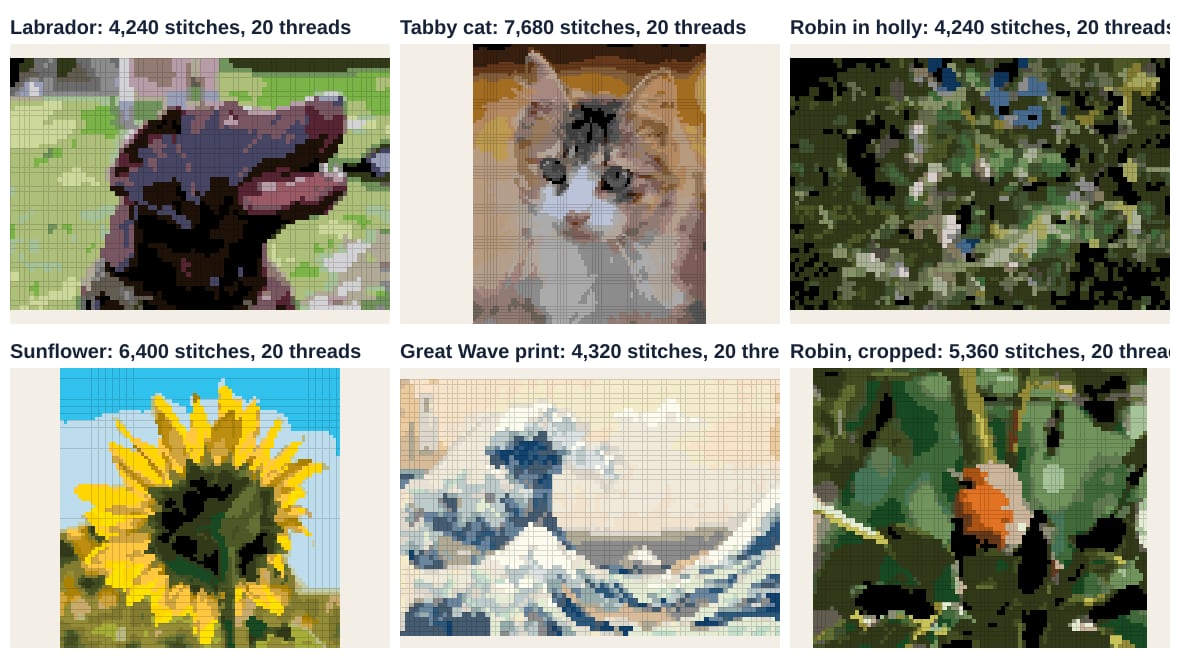
Figure 1. The six charts. Figures from the Threadhood converter, run on 3 November 2026.
We tracked five things: stitches, mean color difference (ΔE) between photo and thread, stitches changed by Tidy lone stitches, single stitches left over, and the share held by the busiest thread.
What the numbers say
| Photo | Stitches | Mean ΔE | Changed by Tidy | Lone stitches left | Busiest thread | Its share |
|---|---|---|---|---|---|---|
| Labrador | 4,240 | 6.2 | 149 | 2 | 471 | 21.9% |
| Tabby cat | 7,680 | 5.2 | 201 | 0 | 451 | 10.4% |
| Robin in holly | 4,240 | 6.0 | 911 | 33 | 934 | 37.1% |
| Sunflower | 6,400 | 5.7 | 384 | 9 | 827 | 17.2% |
| Great Wave print | 4,320 | 3.7 | 552 | 16 | Ecru | 15.8% |
| Robin, cropped | 5,360 | 6.0 | 406 | 15 | 934 | 25.8% |
Table 1. Six photos at 80 wide, 20 colors, DMC. Mean ΔE is the average CIEDE2000 color difference between the photo and the threads chosen. Figures from the Threadhood converter, run on 3 November 2026.
A few things jump out.
The robin is the outlier
Look at the third row. The robin in holly had 911 stitches changed by clean-up. That is 21.5 percent of the chart (911 divided by 4,240), against 3.5 percent for the Labrador. It also had the most lone stitches left, 33, and one thread, DMC 934 Avocado Green Black, held 37.1 percent of all stitches.
Dark leaves, light gaps and tiny highlights make up that photo, and the small bird is a speck in it. At 80 stitches the converter has to make a call for each square, and in a scene this fine the calls scatter. Our reading: the chart comes out as a green blur with black holes.
Flat shapes score best
The Great Wave has the lowest mean ΔE by a wide margin, 3.7. It is a print with large areas of flat color, so each stitch can sit close to its source color. Yet it still had 552 stitches changed by Tidy lone stitches (12.8 percent), because the foam is made of small flecks. Easy colors, busy texture.
The tabby cat also did well. It has the most stitches here because the photo is tall (80 x 96). Its mean ΔE is 5.2, and it left no lone stitches at all. Its busiest thread holds only 10.4 percent, so no single color dominates the chart.
What a cluttered background costs
The sunflower tells a different story. Its busiest thread is DMC 827 Blue Very Light, the sky, at 1,099 stitches. We also tallied stitches by thread hue. Blue threads hold 2,090 of the 6,400 stitches, about a third (32.7 percent). A third of the chart is sky before you reach a single petal.
The Labrador shows the same effect with grass. Its busiest thread is DMC 471 Avocado Green Very Light, and green threads hold 1,448 of 4,240 stitches. We covered that dog in our step by step guide to turn a picture into cross stitch.
Which photos make the best cross stitch patterns?
From six photos, a pattern shows up. The best candidates share four traits.
- One subject that fills the frame. The tabby was framed close. The robin in holly was not.
- Big shapes. Petals, ears and waves survive at 80 stitches. Leaves, whiskers and grass blades do not.
- Light from one side. Strong shadow edges turn into clean borders between two threads.
- A soft or plain background. The tabby's soft backdrop did not eat the color budget; its busiest thread holds only 10.4 percent.
A rule of thumb follows from this. If you can describe the picture in one short sentence ("a cat looking at me"), it will probably convert well. If it takes two ("a bird somewhere in some leaves"), crop first.
Why does my photo chart look muddy?
Mud comes from a mismatch between the number of squares and the amount of detail. When many tiny things compete for few stitches, the converter averages them into dull in-between colors.
The robin shows what to do. We cropped the same bird tighter and ran it again at the same settings. The numbers moved the right way:
- Stitches changed by Tidy lone stitches fell from 911 to 406.
- Lone stitches left fell from 33 to 15.
- The busiest thread's share dropped from 37.1 to 25.8 percent.
- Stitches in orange threads rose from 70 to 129.
Nothing else changed, apart from the crop. The photo got better by being smaller, not by turning a dial. Our bird cross stitch pattern case study takes that one photo much further.
So when a chart looks muddy, work in this order:
- Crop tighter, so the subject fills most of the frame.
- Try a wider chart, if the subject is small.
- Try fewer colors, not more.
- Read the key and swap odd threads.
Checking your own photo in five minutes
Before you choose a thread or a fabric, run the photo once. Then read three things.
- The busiest thread. If it is a background color, crop.
- The count of threads and stitches. The size line tells you whether the project suits your free evenings.
- The preview itself. If you cannot tell what the picture is from arm's length, it will not work stitched either.
Our guide to choosing a photo has side by side examples. And if you plan to share your chart or sell it, the rights matter. The U.S. Copyright Office says:
"Your work is under copyright protection the moment it is created and fixed in a tangible form that it is perceptible."
U.S. Copyright Office, Copyright FAQ
A photo you took is yours. For anyone else's, check the license, or choose a CC0 image like the ones above.
What these numbers cannot tell you
Six photos is a small test. We used one setting, one brand and one width. A different width or color count would move every number. Mean ΔE measures how close threads sit to the photo, not whether the stitched piece looks good, and we did not rank the charts by looks. Use the table to learn what to look for, then test your own photo.
Ready to see yours? Make a cross stitch pattern from your photo free in your browser. The photo stays on your device.
Frequently asked questions
Which photos make the best cross stitch patterns?
Photos with one clear subject, big shapes, light from one side and a plain or soft background. In our six photo test, the Great Wave print (mean color difference 3.7) and the tabby cat (5.2) came out closest to their photos. The cluttered robin in holly was the hardest.
Why does my photo chart look muddy?
Usually the photo is too busy for the number of stitches, so the converter has to spend its colors on leaves, shadows or background. Crop tighter, raise the width a little, or choose a calmer photo. Adding colors rarely helps.
Can I use any photo from the internet?
A photo you took is yours to use. For someone else's picture, check the license first. The photos in this study are CC0 or public domain, which allow free use for any purpose.
How wide should I make a cross stitch pattern from a photo?
We used 80 stitches wide for every photo here, which is 5.7 inches on 14 count Aida. Raise the width for faces and fine detail, and lower it for bold shapes like flowers.
Try it with your own photo
The pattern maker runs in your browser. No account, no upload, and you see the chart in seconds.
Open the cross-stitch pattern maker