Academy
Cross Stitch Pattern Generator Settings, Tested
By Threadhood Content Team · · 8 min read
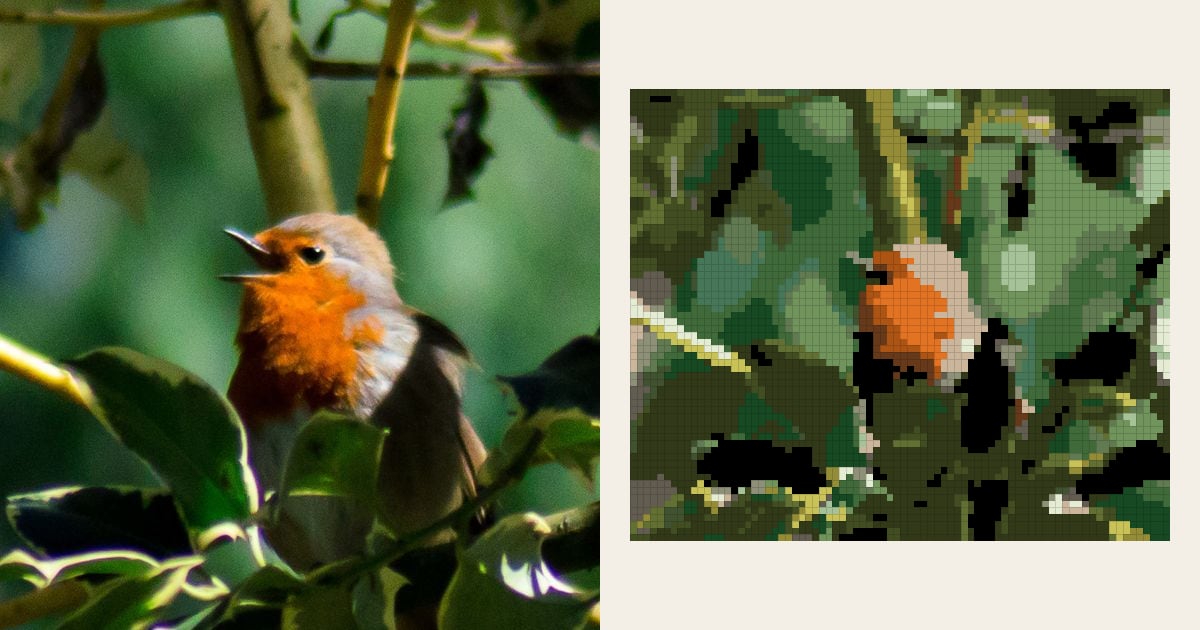
Every cross stitch pattern generator has the same four or five settings: width, number of colors, a thread brand, and a toggle with a name like "dithering". Most guides tell you what they do in general terms.
We wanted numbers. So we took one photo of a European robin and ran it through the Threadhood generator in 12 different ways, changing one thing at a time. We counted stitches, threads, skeins and single "confetti" stitches for each run.
Some results surprised us. The biggest one: the setting that mattered most isn't a setting at all.
How a cross stitch pattern generator turns a photo into a chart
A quick look under the hood helps the results make sense. Threadhood does five things, in this order:
- Shrinks the photo onto the grid. Each stitch gets the average color of its patch of photo.
- Groups similar colors. It finds clusters of colors that belong together.
- Matches each group to a real thread. It compares against all 489 DMC colors (or 445 Anchor) and keeps the closest.
- Assigns every stitch a thread from that short list.
- Tidies up, if you ask it to, by replacing lone stitches with a neighbor's color.
Step 3 uses a formula called CIEDE2000. It's the color difference measure published by the International Commission on Illumination (CIE) in its technical report CIE 142:2001. In the CIE's words:
"The recommended model is an extension of the CIE 1976 (L*a*b*) colour-difference model."
CIE 142:2001, Improvement to Industrial Colour-Difference Evaluation
In plain English, it scores how different two colors look to a person, not to a computer. A score under 1 is invisible. Above 5 is a different color. We checked our version against the 34 published test pairs from Sharma, Wu and Dalal's implementation notes at the University of Rochester.
We report the average color error for each run below. It's the mean CIEDE2000 score between each stitch's patch of photo and the thread it got. Lower is closer to the photo.
Test 1: does cropping matter more than settings?
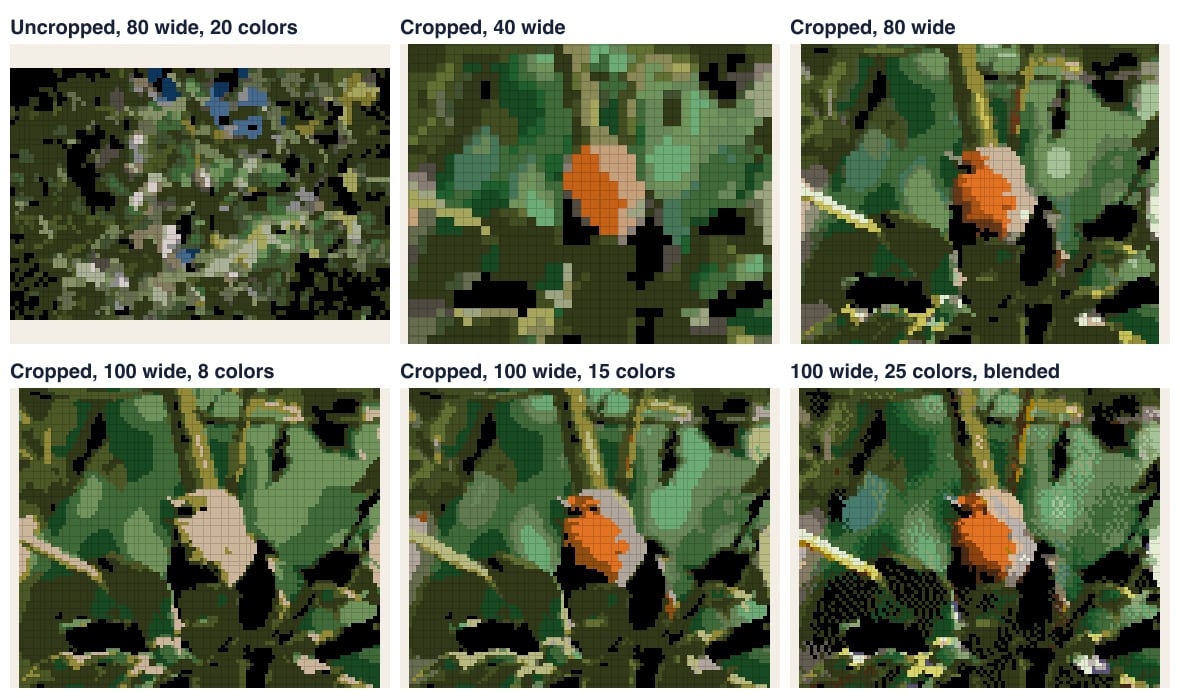
Yes, by a mile. Our photo is a small robin in the middle of a big holly bush. We ran it twice at the default settings (80 stitches wide, 20 colors), once as it was and once cropped close around the bird.
| Photo | Grid | Stitches | Orange threads | Stitches in orange | Lone stitches tidied |
|---|---|---|---|---|---|
| Uncropped | 80 x 53 | 4,240 | 0 | 0 | 911 |
| Cropped to the bird | 80 x 67 | 5,360 | 3 | 187 | 406 |
Table 1. The same robin, same settings. "Orange threads" are DMC 922 Copper Light, 801 Coffee Brown Dark and 920 Copper Medium.
Uncropped, the generator spent all 20 colors on leaves and shadow. Not one orange thread made the list, so the robin simply isn't in the chart. The leaves also made the chart busy: 911 stitches had to be tidied.
Cropped, the robin's breast got three orange and brown threads and 187 stitches. Same tool, same settings, completely different chart.
Takeaway: crop until your subject fills the frame. Our guide to choosing a photo shows more examples.
What size should a cross stitch pattern be?
Next we kept the crop and the 20-color limit, and changed only the width.
| Width | Grid | Stitches | Size on 14-count Aida | Skeins (2 strands) | Stitches in orange |
|---|---|---|---|---|---|
| 40 | 40 x 33 | 1,320 | 2.9 x 2.4 in | 20 | 65 |
| 80 | 80 x 67 | 5,360 | 5.7 x 4.8 in | 20 | 187 |
| 120 | 120 x 100 | 12,000 | 8.6 x 7.1 in | 21 | 353 |
| 160 | 160 x 133 | 21,280 | 11.4 x 9.5 in | 24 | 812 |
Table 2. Width against stitch count and thread. Skeins assume 8 m skeins of six-strand cotton and about 1,826 full crosses per skein with two strands on 14-count.
Two things jump out.
Stitches grow with the square of the width. Double the width and you get about four times the stitching. 160 wide is 16 times the work of 40 wide. That's the real cost of "more detail".
Thread barely moves. At 20 colors you buy at least 20 skeins whatever the size, because each color needs one. Even at 21,280 stitches only three colors needed more than one skein: the darkest leaf green needed three, black and another dark green two each. So a small chart with many colors can cost as much in thread as a big one.
At 40 wide the robin was an orange block with a pale cap. You'd only know it was a bird if someone told you. At 80 it was clearly a robin, beak open. Past 120, most of the extra stitches went into the leaves. For this photo, 80 to 120 was the sweet spot. The fabric size calculator shows the finished size for any width and fabric.
How many colors should a cross stitch pattern have?
Now the color slider. Same crop, 100 stitches wide (8,300 stitches every time), and four color limits.
| Colors | Average color error | Robin's breast | Lone stitches tidied | Lone stitches left | Skeins |
|---|---|---|---|---|---|
| 8 | 7.5 | missing | 232 | 3 | 9 |
| 15 | 6.4 | 2 orange threads | 383 | 2 | 16 |
| 25 | 5.9 | 2 orange threads | 463 | 15 | 26 |
| 40 | 5.4 | 4 orange and brown threads | 779 | 41 | 41 |
Table 3. Color limit against accuracy and effort. Average color error is the mean CIEDE2000 difference between each stitch and its patch of photo.
Read the error column top to bottom. From 8 to 15 colors it drops by 1.1. From 15 to 25, by 0.5. From 25 to 40, by another 0.5, while you buy 15 more skeins.
That's the classic curve of diminishing returns. The first colors buy a lot of accuracy. Later ones mostly buy subtle shading.
The other cost is hidden in the lone stitches. At 40 colors there are so many near-identical shades that 779 stitches had no same-color neighbor, and 41 were still alone after tidying. Each of those is a start and a finish for one cross.
And at 8 colors? The robin's orange breast vanished again. With only 8 threads to share out, the greens won.
Takeaway: start at 15 to 25 colors. If your subject's key color is missing, go up. If the chart looks muddy, go down.
What does blending (dithering) do?
Last test. Threadhood calls dithering Blend colors. It mixes stitches of two threads in a pattern so that, from a distance, you see an in-between shade.
We ran the cropped robin at 100 wide and 25 colors, with blending off and on.
| Blend colors | Lone stitches before tidying | Lone stitches after tidying | Average color error |
|---|---|---|---|
| Off | 463 | 15 | 5.9 |
| On | 991 | 22 | 7.0 |
Table 4. Dithering against single stitches. Same photo, width and colors.
Blending more than doubled the single stitches. Tidying cleans most of them up, but that also undoes much of the blending.
Why did the average error go up? Because it scores each stitch alone. Dithering deliberately puts a "wrong" color in some stitches so that a patch averages out right. It looks smoother from across a room and noisier up close.
Our advice: leave it off for animals, flowers and anything with edges. Try it for skies, sunsets and skin, where smooth gradients matter more.
Settings cheat sheet for any cross stitch pattern generator
These numbers came from Threadhood, but the patterns hold for any generator that works by grouping colors and matching threads.
- Crop first. It changed our chart more than any slider.
- Width: 40 to 80 for bold shapes, 80 to 120 for animals, 100 or more for faces.
- Colors: 15 to 25 for most photos. Check your subject's main color made it in.
- Blending: off, unless the photo is mostly sky or skin.
- Tidy lone stitches: on. It turned 406 fiddly single stitches into blocks on our default run.
Common pitfalls we saw in the tests
- Raising colors to fix a missing subject. It helped here at 15, but cropping fixed it at 20 colors and a smaller chart.
- Judging a chart at full zoom. Step back from the screen. Stitched work is seen from a few feet away.
- Forgetting the thread bill. Skeins track colors more than size, as Table 2 shows.
- Assuming the screen is the floss. Thread colors come from published RGB values. Real floss under a lamp looks a bit different, so check key colors against a shade card.
Every cross stitch pattern generator makes these trade-offs; the only question is whether it shows you the numbers. Want to try the same tests on your own photo? Open the cross stitch pattern maker, change one setting at a time and watch the stitch count under the chart. For the full start-to-finish method, see how to turn a picture into a cross stitch pattern. And if you're still picking a tool, our cross stitch pattern maker comparison covers six of them.
Frequently asked questions
How many colors should a cross stitch pattern have?
For most photos, 15 to 30. In our test, 15 colors was the point where the robin's orange breast appeared, and going past 25 added skeins much faster than it added accuracy.
What does dithering do in a cross stitch generator?
Dithering, called Blend colors in Threadhood, mixes stitches of two threads to fake an in-between shade. It smooths gradients seen from a distance, but it scatters single stitches. In our test it doubled them, from 463 to 991 before clean-up.
What size should a cross stitch pattern be?
Big enough for the smallest detail you care about. Our robin read as a robin at 80 stitches wide. At 40 wide it was just an orange block with a pale cap. On 14-count Aida, 80 stitches is 5.7 inches.
What are confetti stitches?
Single stitches with no neighbor of the same color. Each one means starting and finishing a thread for one cross, so charts full of them are slow. Threadhood's Tidy lone stitches option replaces them with a neighboring color.
Is a cross stitch pattern generator accurate?
It's as accurate as the thread colors it knows. Threadhood compares every square to 489 DMC or 445 Anchor colors with CIEDE2000, the color difference formula the CIE recommends. Real floss still looks a little different from a screen, so check key colors against a shade card.
Try it with your own photo
The pattern maker runs in your browser. No account, no upload, and you see the chart in seconds.
Open the cross-stitch pattern maker